


Xfinity
3.891.35K Reviews
App Specs
- Version
- 6.9.0-9
- Updated On
- License
- Free
- Downloads
- 10,000,000+
- Developer
- Comcast
- Categories
- Productivity
- Platform
- Android, iOS
Screenshots
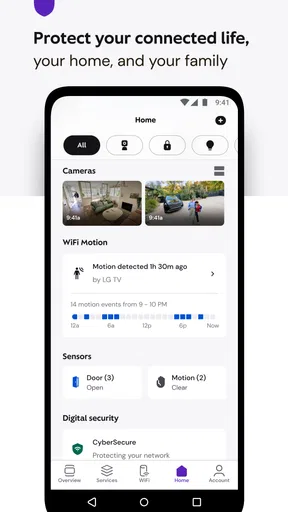
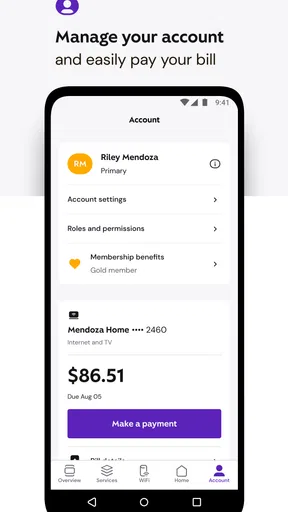
 Analysis by AppCompare
If you've been on the hunt for a solid app to manage your internet, TV, and phone services, let me introduce you to Xfinity. I've been using it for a while now, and I’ve got some thoughts to share.
One place to handle the account basics
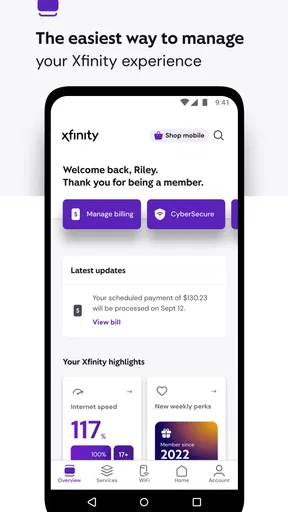
The most useful way to think about this app is as a mobile control point for Xfinity services, rather than a general-purpose productivity tool. I find that distinction important: it is aimed at people who already use Comcast services and want to handle routine account tasks without switching to a computer. Checking usage, paying a bill, and beginning troubleshooting from a phone are the kinds of jobs that make the app worthwhile in ordinary life.
That focus also sets expectations. If you are looking for an app to organize work projects, notes, or a household calendar, this is not the right kind of productivity app. Its value comes from putting service management within reach when you are away from home or simply do not want to open a browser. For an existing customer, that can turn a small chore into something you finish while waiting for coffee or sitting on the train.
Getting Started with Xfinity
First things first, downloading the Xfinity app was a breeze. It's available on both Android and iOS, so no worries about compatibility. After logging in with my credentials, I was greeted with a clean and intuitive interface. Everything's laid out in a way that even my tech-averse grandma could navigate.
Features That Stand Out
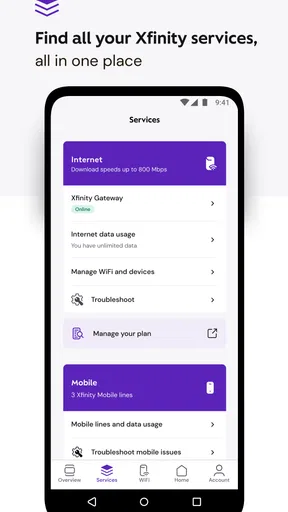
What really caught my attention was how seamless it is to manage my services. Need to check your internet usage? Done. Want to pay your bill without the hassle of logging into a website? Easy peasy. The app even lets you troubleshoot issues right from your phone — no more waiting on hold forever with customer service. Hallelujah!
In practical terms, the combination matters more than any one task. I can check the account, take care of a payment, and start looking into a connection problem from the same place. That makes it especially handy when I am trying to rule out a service issue before changing settings on a device or calling for help. I would still treat troubleshooting as a first step, not a guarantee that every problem can be fixed in the app; some situations may need further assistance.
A useful habit is to check usage before the end of a billing period rather than only when something seems wrong. It gives me a better chance of spotting a change in household habits—perhaps more streaming while someone is home—or noticing that a question about internet use is really an account question. The app can help me see the relevant account information, but it does not replace the conversation a household may need to have about how everyone uses the connection.
Worth Reading Before You Choose

EA SPORTS FC Mobile 26 Is a Bigger Football Game, but It Takes Time

Flipboard Shows What News Apps Must Do Beyond the Feed

Switching to Android Auto Means Rethinking Your Driving Routine

Google Calendar Makes a Crowded Week Easier to Manage

Ludo King Makes the Most of the Minutes Between Plans

Baby Panda World Brings Quick Play to Modern Phones, but Its Game Library Feels Busy
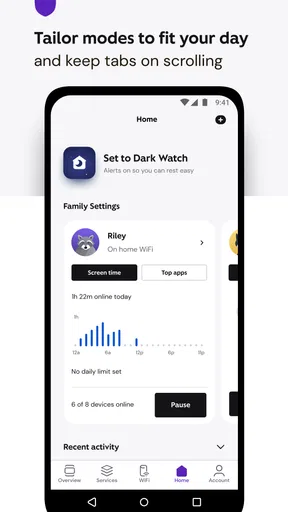
Another feature I love is the ability to set up parental controls. If you’ve got kids, this is a game-changer. You can easily set limits on screen time or block inappropriate content. It’s all about keeping the little ones safe while giving you some peace of mind.
For families, I would approach those controls as a practical household aid, not as a substitute for talking with children about online boundaries. It is worth reviewing the settings together and checking that the rules fit the family’s routine, especially when schoolwork, shared devices, or different bedtimes are involved. That small bit of planning can make controls less frustrating than changing limits in the middle of a disagreement.
A realistic moment when it earns its place
Picture getting home and finding that a video call keeps breaking up just as you need to join a family conversation. Instead of immediately restarting every device, I would open the app, look at the account and usage details that are available, and try its troubleshooting route. If that points to something simple, I can act without setting aside time for a separate support call. If it does not resolve the issue, I have at least taken a sensible first step and can explain what I already tried when seeking help.
The same convenience applies to bill administration. If a reminder arrives while I am out, being able to deal with the payment through the phone means I do not have to remember to do it later at a laptop. I would still take a moment to confirm the account and payment details before submitting anything; convenience is useful, but it is no reason to rush through a financial task.
Where it fits among the alternatives
Compared with managing services through a browser, the app is better suited to quick checks and short tasks on the move. A website may be more comfortable when I want to inspect account details on a larger screen or handle several things carefully in one sitting. The app’s strength is that the service account is already in a phone-friendly setting, with troubleshooting and everyday management close at hand.
It also differs from a standalone Wi-Fi or device-management tool. Those alternatives can be a better fit when the main job is configuring a home network or controlling equipment that is not part of an Xfinity account. Here, the center of gravity is the customer relationship: services, usage, billing, and support. I would choose this app for managing those parts of an Xfinity setup, not assume it replaces every network utility I might use.
That distinction is helpful if you are deciding whether to install it. If you are not an Xfinity customer, most of the app’s purpose will not apply to you. If you are, it can reduce the number of steps between noticing an account-related task and taking care of it. I would not install it just because I want a generic tool for monitoring internet traffic or managing a different provider’s equipment.
What's the Catch?
Alright, let's talk about the not-so-great bits. Sometimes the app can be a bit slow, especially when trying to access certain features like the DVR settings. It’s not a deal-breaker, but it can be a tad annoying when you’re in a hurry.
Also, while the app is generally reliable, I’ve experienced a couple of glitches where it wouldn’t load my account info. It usually resolves itself after a quick restart, but it’s one of those things that can make you roll your eyes.
Those hiccups matter most when the app is your only plan for handling something time-sensitive. I would not rely on it as the sole way to resolve an urgent service problem or leave an important account task until the last minute. If a screen stalls, restarting the app is a reasonable first try; if the issue persists, switching to another support route is more practical than repeatedly tapping the same option.
The experience can also depend on what you are trying to do. A quick balance check or payment is a natural fit for a phone, while a more involved task—such as carefully reviewing account information or working through a complicated setup—may feel easier on a larger screen or with direct support. That is not a reason to avoid the app; it is a reason to use it for the jobs it handles well and keep another route in mind for the rest.
Who gets the most out of it
I would recommend it most to people who already have Xfinity services and regularly need to check usage, pay a bill, manage household controls, or start troubleshooting. It is particularly useful if you handle the account for a family or shared home, because those small administrative jobs tend to appear at inconvenient times. Having the account tools on a phone can make them easier to fit into a busy day.
People who prefer to do all account administration on a computer may not gain much from installing it, and customers who rarely need to manage their services might find that a browser is enough. I would also skip it if you are seeking a universal network-management app: this one is most relevant inside the Xfinity ecosystem. That makes its usefulness personal rather than universal, but it is a clear advantage for the audience it serves.
Final Thoughts
Overall, the Xfinity app is a handy tool for anyone looking to manage their services with ease. Despite a few hiccups, its convenience and range of features make it a must-have if you're already an Xfinity customer. Whether it’s controlling your WiFi or paying bills on the go, this app has got you covered.
It is a free productivity app from Comcast, rated for Everyone, and its current version is 5.65.0-1, with Android 10 as the minimum operating-system requirement. It has a 3.6 average from around 315,000 ratings, with about 85,000 written reviews, and has been installed over 10 million times. Those figures suggest a widely used service companion, though the average rating is a reminder that convenience does not mean every account task will feel smooth for every person.
If you're interested in giving it a whirl, you can download it directly from the App Store or Google Play. Trust me, once you get the hang of it, you’ll wonder how you ever managed without it.
Pros
- User-friendly interface enhances navigation.
- Wide range of streaming options available.
- Customizable parental controls.
- Seamless integration with smart home devices.
- 24/7 customer support is very responsive.
Cons
- App occasionally freezes or lags.
- Some content requires additional payment.
- Limited offline viewing options.
- Advertisements can be intrusive.
- Requires stable internet connection.
FAQs for Xfinity
What features does the Xfinity app offer?
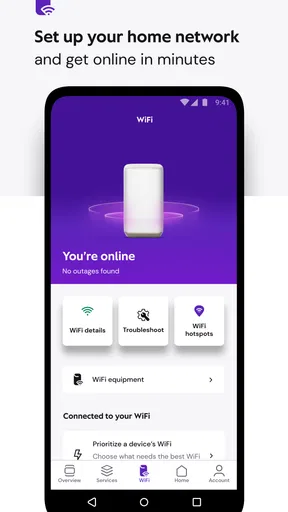
The Xfinity app provides a range of features designed to enhance the user experience. It allows users to manage their Wi-Fi network, troubleshoot connectivity issues, pay bills, and even control home security systems. Additionally, the app supports voice commands and offers personalized content recommendations, making it a comprehensive tool for managing Xfinity services.
Is the Xfinity app compatible with all devices?
The Xfinity app is compatible with most iOS and Android devices. Users need to ensure that their device is running a supported operating system version, typically iOS 11.0 or later for Apple devices and Android 6.0 or later for Android devices. Compatibility may vary, so it’s advisable to check the app store for specific requirements.
How secure is the Xfinity app?
Security is a top priority for Xfinity, and the app incorporates various measures to protect user data. It uses encryption protocols for data transmission and offers features like multi-factor authentication for added security. Users are encouraged to use strong passwords and keep their app updated to benefit from the latest security enhancements.
Does the Xfinity app require an internet connection to function?
Yes, the Xfinity app requires an internet connection to access most of its features. Whether you're managing your Wi-Fi settings, streaming content, or checking your account, a stable internet connection ensures seamless functionality. Some features may be accessible offline, but their availability will be limited.
Can multiple users access the Xfinity app with the same account?
Multiple users can indeed access the Xfinity app using the same account credentials, making it convenient for families or shared households. However, each user should be aware of the account’s login details, and it's recommended to monitor app activity to maintain account security. Users can set up individual profiles for a personalized experience.


